Download Pinterest GIFs in HD — Free, No Watermark, No Login
In short: PinSaver lets you download Pinterest GIFs and animated pins in original HD quality — no login, no watermark, works on mobile and desktop. Best for meme creators, social media managers, content creators, and anyone saving animated Pinterest content.
PinSaver is a free Pinterest GIF downloader. Paste a Pinterest link to save animated GIFs in high quality with no watermark and no login — on any device.
How to Download GIFs from Pinterest — 4 Simple Steps
Downloading a Pinterest GIF with PinSaver takes under 60 seconds. No app install, no registration — just copy, paste, and download.
To download GIFs from Pinterest, copy the Pin link, paste it into the PinSaver input box, and click the download button. The animated GIF will immediately save to your device for free.
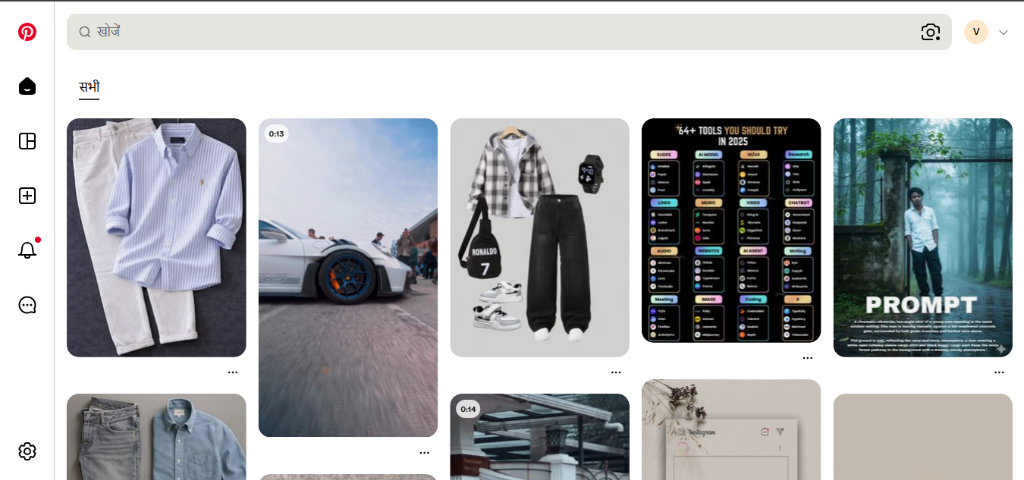
Open Pinterest
Open the Pinterest app or website. Find the animated GIF pin you want to save.
💡 Tip: Animated GIFs are often marked with a 'GIF' badge on Pinterest.
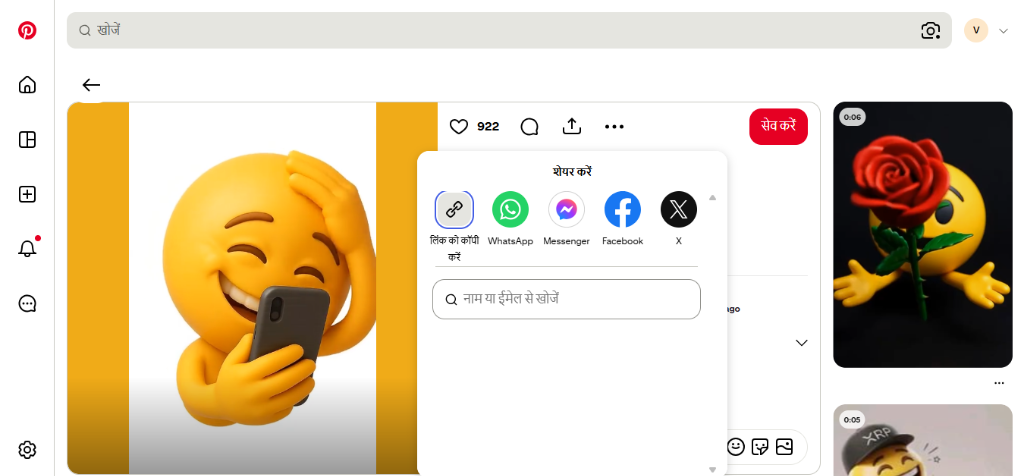
Copy the Pin Link
Tap the ••• icon on the pin and select "Copy Link". On desktop, copy the URL from your browser's address bar.
💡 Tip: On desktop, you can copy the URL directly from the address bar.
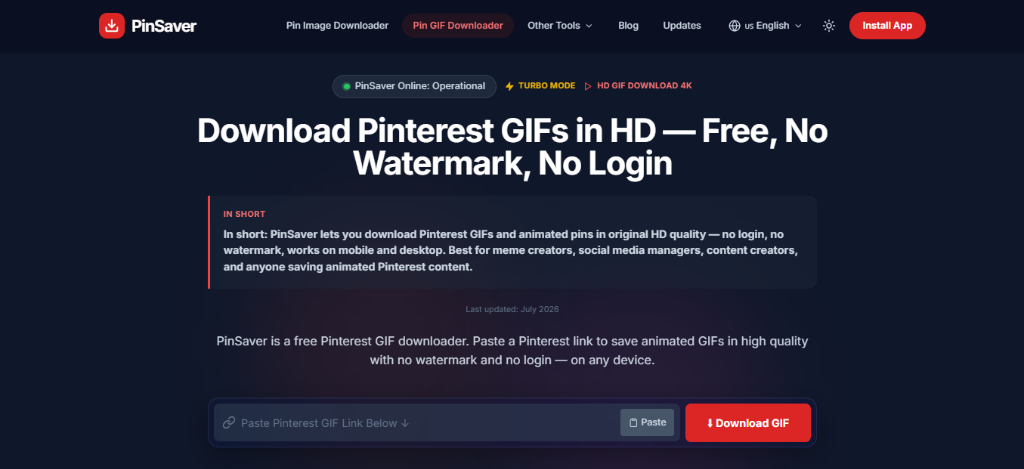
Paste on PinSaver
Paste the copied Pinterest link into the input box above on this page.
💡 Tip: PinSaver will automatically detect that the link is for a GIF.
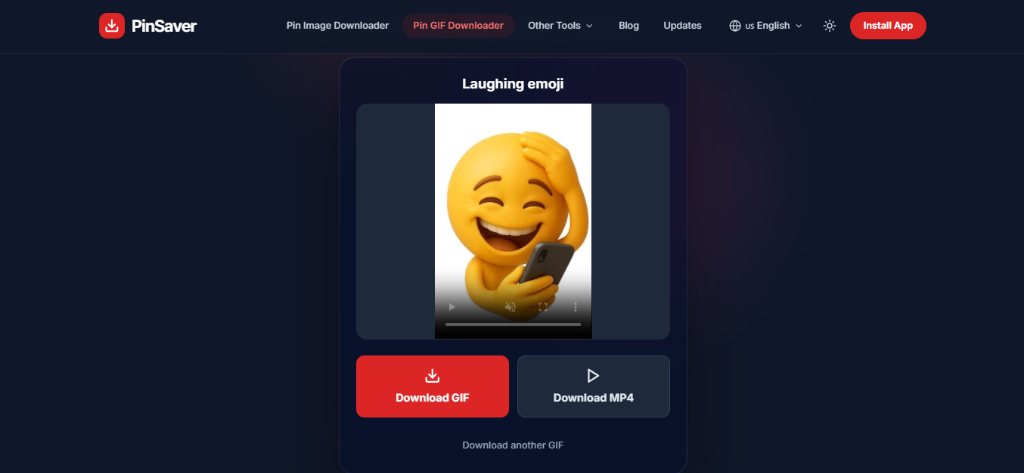
Click Download
Hit the Download GIF button. Your animated GIF will be saved to your device in full quality, instantly.
💡 Tip: If the download downloads as MP4, it will loop just like a GIF on all messaging apps.
📱 How to Download Pinterest GIFs on iPhone
Open the Pinterest app → Find the animated GIF pin → Tap the Share icon (•••) → Copy Link → Open Safari → Visit pinsaver.online/pinterest-gif-downloader → Paste link → Tap Download GIF → Tap the downloaded file → Save to Photos or Save to Files.
🤖 How to Download Pinterest GIFs on Android
Open the Pinterest app → Find the GIF pin → Tap Share → Copy Link → Open Chrome → Go to pinsaver.online/pinterest-gif-downloader → Paste link → Tap Download GIF → The animated GIF is saved directly to your Downloads folder or Gallery.
💻 How to Download Pinterest GIFs on PC / Desktop
Open Pinterest in your web browser → Locate the animated GIF pin → Copy the URL from your browser's address bar → Visit pinsaver.online/pinterest-gif-downloader → Paste the URL → Click Download GIF → The looping animation will be saved directly to your default downloads folder in high quality.
Why PinSaver is the Best Pinterest GIF Downloader
PinSaver is the best Pinterest GIF downloader because it preserves all original animation frames and quality without adding watermarks or requiring a signup.
Not all Pinterest GIF downloaders are equal. PinSaver is purpose-built for GIFs — preserving animation frames, quality, and file integrity that generic tools often destroy.
Animation Preserved
Many tools save only the first frame. PinSaver downloads the complete animated GIF — every loop, every frame intact.
Zero Watermark
We never add any watermark or branding to your downloaded GIFs. What you get is exactly what Pinterest originally hosted.
Instant Download
No waiting, no queue. PinSaver fetches and delivers your Pinterest GIF in seconds — even on mobile networks.
Privacy-Safe
No account creation. No data stored. No activity tracking. We process your URL and nothing else — ever.
Works on All Devices
iPhone, Android, Windows, Mac, tablet — PinSaver works on every device through any modern browser. No app required.
Completely Free
PinSaver's Pinterest GIF Downloader is 100% free with no hidden fees, premium tiers, or download limits.
Supported Quality & Formats
We provide the highest quality downloads for all types of Pinterest GIFs and animations.
Supported Qualities
- Original Resolution: Exact quality as uploaded by creator.
- HD (1080p+): Perfect for clear animations.
- Lossless: No compression applied during download.
Supported Formats
Install the PinSaver App
Did you know you can install PinSaver directly on your phone? Get the full PinSaver App experience without visiting the App Store. It's fast, lightweight, and always one tap away for all your Pinterest GIF downloads.
Why Some Pinterest GIFs Download as MP4 — Explained
Pinterest often converts animated GIFs into MP4 video format on their servers to reduce file size and optimize loading performance. When this happens, PinSaver downloads the looping MP4 file to ensure high quality and smooth animation playback.
Pinterest doesn't always serve animated content as traditional GIF format files. To improve loading speed and visual quality, Pinterest often converts large GIFs into MP4 or WebM video files on their servers. This is called "GIF-as-video."
gifDownloader.mp4Desc
| Pinterest Pin Type | What You Get | Loops? | Quality |
|---|---|---|---|
| True GIF File | Animated .GIF | ✅ Yes | Original quality |
| GIF-as-Video (MP4) | MP4 video (loops like GIF) | ✅ Yes | Better than GIF |
| Idea Pin / Animation | MP4 / WebM | ✅ Yes | HD quality |
Works on All Devices & Browsers
PinSaver's Pinterest GIF Downloader is a browser-based tool — no installation needed. It works seamlessly across:
On iPhone: After downloading, tap the file and choose "Save to Files" or "Save to Photos." On Android: The GIF saves automatically to your Downloads folder. On PC/Mac: The file appears in your Downloads folder immediately.
Who Uses the Pinterest GIF Downloader?
The Pinterest GIF Downloader is widely used by content creators, social media managers, meme artists, designers, and students to save animated graphics for offline reference and projects.
Millions of people download GIFs from Pinterest for different creative and practical purposes. Here's how PinSaver helps:
Content Creators
Save aesthetic GIFs and animations for mood boards, presentations, or creative inspiration without losing quality.
Social Media Users
Download reaction GIFs and funny animations to share on WhatsApp, Instagram, Telegram, or Discord.
Food & DIY Enthusiasts
Save looping recipe tutorials and DIY hack GIFs for offline reference — perfect for the kitchen or workshop.
Students & Educators
Download educational animated diagrams and explainer GIFs to use in study notes or teaching materials.
E-commerce & Marketers
Save animated product demos and promotional GIFs for marketing campaigns and social ads.
Artists & Animators
Collect animated art and motion design GIFs as creative reference for your own animation projects.
PinSaver vs Other Pinterest GIF Downloaders
Here's how PinSaver compares to other tools when it comes to downloading GIFs from Pinterest:
Best for: Meme creators, social media managers, content creators, and anyone saving animated Pinterest content.
| Feature | PinSaver | Generic Downloaders | Video-First Tools |
|---|---|---|---|
| GIF Animation Preserved | ✅ Always | ❌ Often broken | ❌ Saves as MP4 only |
| No Watermark | ✅ Yes | ✅ Yes | ✅ Yes |
| GIF + MP4 Auto-Detection | ✅ Yes | ❌ No | ❌ No |
| Mobile Optimized (iPhone/Android) | ✅ Fully | ⚠️ Partial | ✅ Yes |
| No Login Required | ✅ Yes | ✅ Yes | ✅ Yes |
| GIF-Focused Page (not mixed) | ✅ Yes | ❌ Mixed tools | ❌ Video-focused |
| Privacy (No Data Stored) | ✅ Yes | ⚠️ Varies | ⚠️ Varies |
About PinSaver — Pinterest GIF Downloader
PinSaver was built to solve a simple frustration: Pinterest shows beautiful animated GIFs but provides no native way to save them. Whether it's a satisfying animation, a recipe tutorial loop, a funny reaction GIF, or aesthetic motion art — users have no built-in option to keep what they discover.
We built PinSaver specifically around GIF downloads — not as an afterthought alongside video tools, but as a dedicated, GIF-first downloader. That means better animation preservation, smarter format detection (GIF vs MP4 fallback), and a cleaner experience on mobile.
PinSaver is not affiliated with, endorsed by, or connected to Pinterest in any way. We operate as an independent tool and do not host any content on our servers — all files are fetched directly from Pinterest's public CDN and delivered to your device.
Is PinSaver Safe to Use?
Yes, PinSaver is 100% safe to use since it does not require account login, does not collect personal data, and processes all downloads securely over encrypted HTTPS.
Yes — PinSaver is completely safe. Here's why millions of users trust us:
- ✅ ✅ We never ask for your Pinterest username or password.
- ✅ ✅ We never store, track, or share any of your data or download history.
- ✅ ✅ All GIF processing happens in real-time and is discarded immediately.
- ✅ ✅ Our site runs on HTTPS with full SSL encryption.
- ✅ ✅ No pop-up ads, no malicious scripts, no hidden downloads.
- ✅ ✅ Verified clean by Google Safe Browsing.
What's New Here!!
PinSaver is continuously improved with updates like global multi-language support, direct PWA app installation, and an advanced agentic backend for faster downloads.
Stay updated with the latest features, bug fixes, and improvements in PinSaver.
Global Multi-Language Support
Added full support for 22 languages with automatic IP-based country detection and RTL support for Arabic and Urdu.
Direct App Installation (PWA)
You can now install PinSaver directly to your device home screen for quick, app-like access.
Agentic Backend Architecture
Completely rebuilt the backend with an intelligent 3-stage agent pipeline for flawless downloads.
Is Downloading Legal?
Downloading GIFs from Pinterest is legal for personal use and offline viewing, provided you respect intellectual property rights and copyright laws.
Use PinSaver for personal use only. If you are downloading content from a creator, please respect copyright laws. Do not re-upload or use any GIF for commercial purposes without the owner's permission.
Frequently Asked Questions — Pinterest GIF Downloader
Everything you need to know about downloading GIFs from Pinterest using PinSaver.
Copy the Pinterest pin link of the animated GIF, paste it into PinSaver's input box on this page, and click Download. Your GIF will be saved to your device in seconds — completely free, no account needed.
Yes, fully. PinSaver is optimized for all mobile devices. On iPhone, the file saves to your Files or Photos app. On Android, it saves to your Downloads folder. No app installation required — just open PinSaver in your browser.
Absolutely. PinSaver never adds any watermark to your downloads. We fetch the original file directly from Pinterest's servers — so you get the clean, original animated GIF without any branding overlaid.
Pinterest converts many GIFs to MP4 or WebM format on their servers to save bandwidth and improve quality. When this happens, PinSaver gives you the MP4 file — which loops exactly like a GIF. If you need a .gif format, you can convert the MP4 to GIF using any free online converter afterward.
Yes, 100% safe. PinSaver never stores your data, does not require any login, and never tracks your download history. We only process the Pinterest URL you submit, deliver your file, and that's it. No spyware, no malware, no tracking.
On Android and PC/Mac: GIFs save to your default Downloads folder. On iPhone/iPad: Tap the downloaded file and choose "Save to Photos" or "Save to Files" to store it. You can then move or rename the file like any other download.
No installation required. PinSaver runs entirely in your web browser — no app, no extension, no software. Just open the page, paste your Pinterest GIF link, and download directly.
PinSaver is a technical tool that accesses publicly available content on Pinterest. However, all GIFs and animated pins belong to their original creators. You should only download content for personal use, and always respect the intellectual property rights of the original creator. Do not redistribute or use downloaded content commercially without permission.
Start Saving Pinterest GIFs Right Now
Free, fast, and watermark-free. Paste any Pinterest GIF link and download it to your device in seconds.