Pinterest Video Downloader
— Save Pin Videos Free in HD, No Watermark
PinSaver is a free Pinterest video downloader. Paste a Pinterest link to save videos, images, and GIFs in HD/4K with no watermark and no login — on iPhone, Android, or PC.
PinSaver is a free, web-based tool designed for anyone who wants to save Pinterest videos, images, or GIFs in original 4K/HD quality. It works directly in the browser of any mobile or desktop device (iPhone, Android, Windows, Mac) without watermark, registration, or software installation.
How to Save a Pin from Pinterest
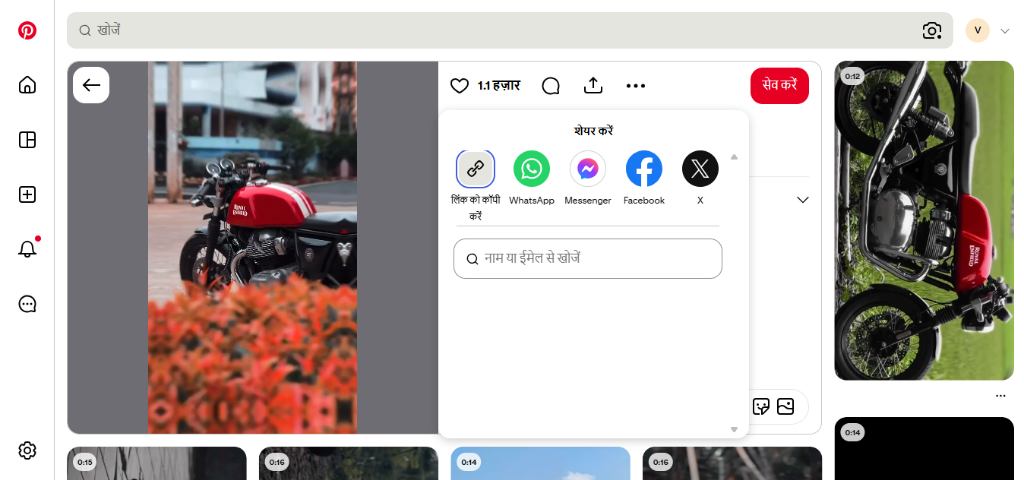
Saving a pin to your device allows you to keep ideas, inspiration, and references handy for offline use. Whether it is an image, video, or GIF, the easiest way to save a Pinterest pin is to copy its URL directly from the share menu on the Pinterest app or site. Once copied, paste this link into PinSaver's online downloader to instantly extract the media file in its highest resolution and download it directly. This simple method lets you download and organize your favorite Pinterest ideas without needing any software.
What is PinSaver?
PinSaver is a free online Pinterest video downloader that saves any Pinterest video, image, or GIF to your device in HD quality. It requires no login, adds no watermark, and needs no app installation. Simply paste the Pinterest URL in the downloader box above and click download to fetch your file in under 10 seconds.
Why use PinSaver?
Pinterest has no official, built-in download button to save video files locally for offline viewing. PinSaver solves this problem by directly accessing Pinterest's media server to extract and deliver the original MP4 or JPG file. It is completely free, does not require an account, works across all platforms (iOS, Android, PC), and preserves the original quality.
Key Features
What Is a Pinterest Video Downloader?
A Pinterest video downloader is a free online tool that lets you save any Pinterest video, reel, or GIF directly to your device. Native downloading on Pinterest often reduces quality or is disabled.
PinSaver bypasses these limits by extracting the full-resolution original media directly from Pinterest's servers. No app installation, no account, no hassle.
Whether you want to download a single video for reference, save fitness routines for offline use, or collect design inspiration — PinSaver is the fastest and easiest Pinterest downloader available.
How to Use PinSaver Online? (Step-by-Step Guide)
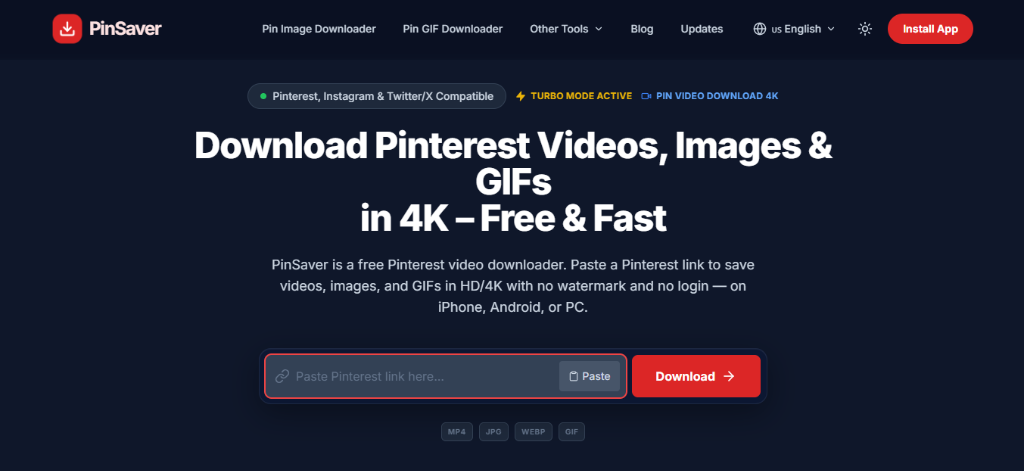
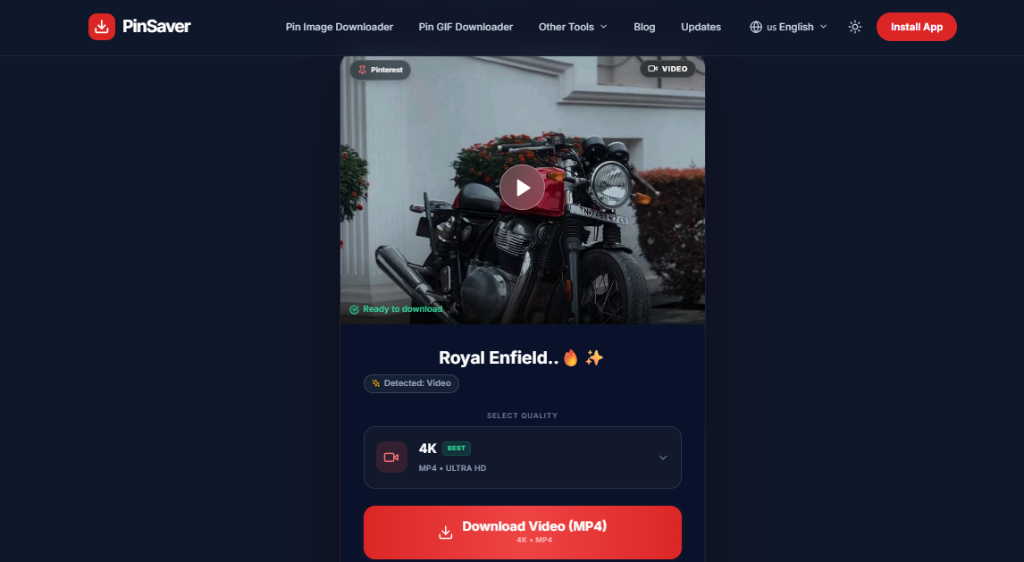
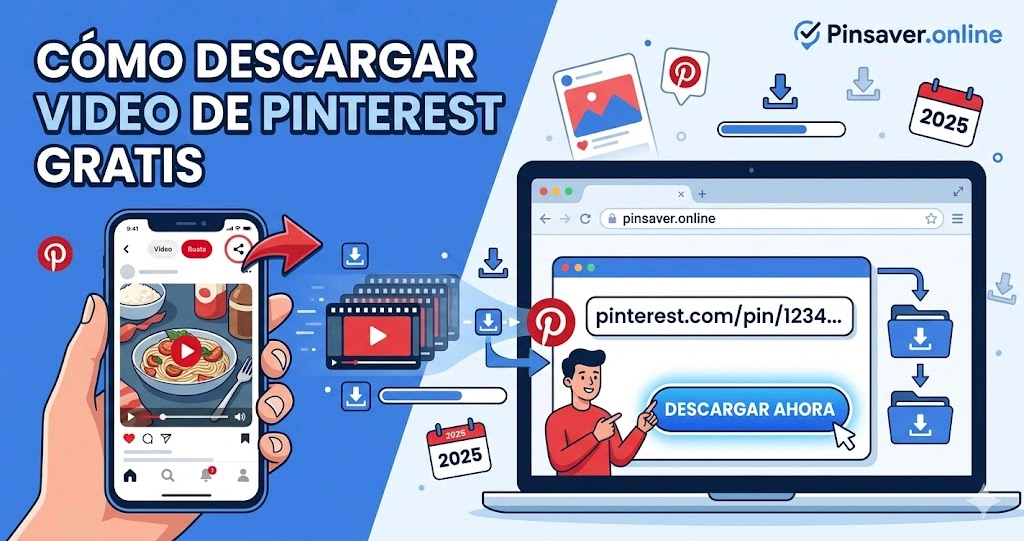
To use PinSaver online, copy the URL of the Pinterest video or image, paste it into the input box at pinsaver.online, and click the Download button. The tool will instantly extract the media file and generate direct download links. Follow these three quick steps:
Step 1: Copy Link
Open the Pinterest App or Website and open the video/image you want to download. Click on the 'Share' button and select "Copy Link".
Step 2: Paste Link
Come to PinSaver.online and paste the link in the search box.
Step 3: Pinterest Pin Download
Click the "Download" button and select your preferred quality to save pinterest video or image directly to your device.
📱 📱 How to Download Pinterest Videos on iPhone
To download Pinterest videos on your iPhone, copy the link of the pin, visit pinsaver.online in Safari, paste the link, and tap Download. You can then save the video directly to your Files or Photos app.
Open the Pinterest app → Find your video → Tap the Share (•••) icon → Copy Link → Open Safari → Visit pinsaver.online → Paste link → Tap Download → Choose your quality.
🤖 🤖 How to Download Pinterest Videos on Android
To download Pinterest videos on an Android device, copy the pin link, visit pinsaver.online in Google Chrome, paste the URL, and click Download. The video will be saved directly into your device's Downloads folder or Gallery.
Open Pinterest app → Tap the video → Tap Share → Copy Link → Open Chrome → Go to pinsaver.online → Paste link → Tap Download → Video saves to your Gallery.
💻 💻 How to Download Pinterest Videos on PC / Desktop
To download Pinterest videos on your PC or Mac, copy the pin's URL from your browser's address bar, visit pinsaver.online, paste it in the center box, and click Download. The file will save directly to your default desktop downloads folder.
Open Pinterest in your browser → Click the pin → Copy the URL from the address bar → Go to pinsaver.online → Paste the URL → Click Download → Video downloads to your PC.
PinSaver Downloader Key Features
High-Speed PinSaver Download
Our pinsaver download servers are extremely fast, ensuring your video is processed and ready for download in just a few seconds. No waiting time!
4K Quality Content
We do not compromise on quality. PinSaver provides the maximum quality available on the Pinterest server (HD, Full HD, or 4K).
Completely Safe & Secure
Your privacy is our priority. We do not keep any record of videos downloaded via PinSaver, nor do we collect your personal information.
No App Installation Needed
You don't need to fill your phone storage. PinSaver is a web-based tool, so you can use it directly from your browser (Chrome, Safari, etc.).
Why Choose Pin Saver?
You should choose PinSaver because it provides the fastest download speeds and extracts the highest possible media resolution (up to 4K) from Pinterest. It requires no installation, is 100% free, and protects user privacy by not storing downloaded files on its servers.
Save Pinterest Video
Use our tool to save pinterest video in high quality with original resolution and no watermarks.
Image Downloader
Save Pinterest images and photos in their original quality and format.
GIF Downloader
Download animated GIFs from Pinterest with full animation preserved.
Story Downloader
Save Pinterest stories before they disappear with our story downloader.
Safe & Secure
Your privacy is protected. No registration required and no data stored.
Lightning Fast
Download your favorite Pinterest content in seconds with our optimized servers.
Multi-Language
Available in 22+ languages to serve users worldwide.
High Quality
Download content in original quality without any compression or loss.
PinSaver vs Other Pinterest Video Downloaders
Compare PinSaver against other online downloaders and apps to see why it is the best tool for saving Pinterest videos:
Best for: Content creators, video editors, social media enthusiasts, and anyone wanting to save Pinterest videos in original HD quality.
| Feature | PinSaver | Generic Downloaders | App-Based Tools |
|---|---|---|---|
| HD/4K Quality | ✅ Up to 4K | ❌ 720p maximum | ⚠️ Often compressed |
| No Watermark | ✅ 100% clean | ✅ Yes | ❌ Adds app logo |
| No Login Required | ✅ Yes | ✅ Yes | ❌ Requires account |
| Download Speed | ✅ Lightning fast | ⚠️ Slow / Ad-heavy | ⚠️ Medium speed |
| Mobile Optimized | ✅ Fully (Safari/Chrome) | ❌ Broken layouts / Popups | ⚠️ Needs app download |
| Privacy (No Data Stored) | ✅ 100% Safe | ⚠️ High ad tracking | ❌ Collects personal data |
PinSaver Online Supported Video Quality & Formats
We provide the highest quality downloads for all types of Pinterest media without any loss in original resolution.
Supported Video Qualities
- 4K (Ultra HD): Highest clarity for large screens.
- 2K (Quad HD): Crystal clear details.
- 1080p (Full HD): Standard high definition for sharing.
- 720p (HD): Best for mobile data saving.
Supported Media Formats
Install the PinSaver App
Did you know you can do a pinsaver app download directly on your phone? Get the full pin saver app experience without visiting the App Store. It is fast, lightweight, and always one tap away for all your Pinterest pin downloads.
What Else Can You Download?
In addition to videos, you can download Pinterest images, animated GIFs, short Reels, and multi-page Idea Pins. PinSaver also supports downloading videos and GIFs from Twitter/X and Instagram Reels.
Pinterest Reels
Download short-form video content effortlessly. Get Reels in the highest possible quality directly to your device.
Pinterest GIFs
Save animated pictures and repeating loops seamlessly without breaking their animation.
Pinterest Images
Download beautiful HD photos, aesthetic wallpapers, and inspirational quotes.
Idea Pins
Easily extract and preserve multi-page stories, DIY guides, and creative Idea Pins before they expire.
Is PinSaver Online Safe to Use?
Absolutely! PinSaver is 100% safe, secure, and user-friendly. We prioritize your privacy above all else. You don't need to install any suspicious software, and there is no need to create an account or provide personal information.
No Registration
Download instantly without ever signing up or sharing your email address with us.
Data Privacy
We strictly do not track, collect, or store any of your downloaded videos or pictures on our servers.
Virus-Free
Our tool is strictly clean. We ensure that your downloads are 100% free from any malware and viruses.
We believe in privacy-first tools that are easy to use and respectful of user data.
What's New Here!!
Stay updated with the latest features, bug fixes, and improvements in PinSaver.
AdSense, Cache & UI Redesign
Integrated Google AdSense Auto Ads site-wide, optimized the backend server with an LRU cache to prevent memory crashes, and added a premium multilingual toast system with layout fixes.
Redirection & Push Notification Fixes
Forced HTTPS and non-www redirection in `.htaccess` configuration to secure traffic, updated push notification badge icons, and optimized push-notify.js head injection.
Automatic Deployments & Build Optimizations
Implemented automated deployment scripts, ignored dist version control, and optimized compilation asset loading for production.
GIF Downloader Upgrades & GSC Crawl Fixes
Revamped Pinterest GIF Downloader layouts, added step-by-step screenshots, supported GIF/MP4 dual downloads. Fixed Google Search Console (GSC) crawl errors by updating search schemas, sitemaps, and deep-nested path rewrites.
Homepage AEO/SEO Optimization
Optimized homepage copy for AI search crawlers (AEO/GEO/SEO requirements), added live verification screenshots, and integrated real-time usage statistics and proof cards.
SSR Pre-rendering System
Implemented a full Server-Side Pre-rendering (SSR) script to build static HTML output for all 16 landing pages, resolving duplicate meta tags and cleaning up schema markup.
Supabase Blog Migration
Migrated the blog database to Supabase as the single source of truth for dynamic articles, completely removing the WordPress backend dependency and fixing API rotation on Render.
Global Multi-Language Support
Added full support for 22 languages with automatic IP-based country detection and RTL support for Arabic and Urdu. Enjoy PinSaver natively in your local language!
Direct App Installation (PWA)
You can now install PinSaver directly to your device home screen for quick, app-like access. Just click the "Install App" button in the top menu to get started!
Smart Video Detection & HD Quality Selector
Fixed media classification so video pins now correctly show 4K, 2K, 1080p & 720p MP4 download options instead of incorrectly displaying JPG format. Improved quality dropdown visibility.
Supported Devices & Platforms
PinSaver works on every device and browser — no installation needed.
Chrome, Firefox
Safari, Chrome
Chrome, Edge
Safari, Chrome
Firefox, Chrome
All browsers
Why People Download Pinterest Videos
Millions of users save Pinterest media every day for creative and personal projects. Here's what's most popular:
Read Our Latest Guides & Articles
Start Downloading Pinterest Videos Now
Free, fast, and watermark-free. Save any Pinterest media in HD — no sign-up, forever free.
Is Downloading Legal?
Yes, downloading Pinterest videos is legal as long as it is for personal use and offline viewing. You must not distribute, re-upload, or commercially exploit downloaded media without the explicit permission of the original copyright holder.
Frequently Asked Questions
What is PinSaver?
PinSaver is a free online Pinterest video downloader that lets you save Pinterest videos, images, and GIFs to your device in high quality (MP4/JPG) without watermarks. No login or app installation is required.
How do I download a Pinterest video using PinSaver?
To download a Pinterest video: copy the pin URL from Pinterest, paste it into the PinSaver input box at pinsaver.online, click Download, and save the file to your device. The whole process takes under 10 seconds.
Is PinSaver free to use?
Yes, PinSaver is completely free. No subscription, no account, no hidden fees — unlimited Pinterest video downloads at no cost.
Does PinSaver work on iPhone and Android?
Yes. PinSaver is browser-based and works on all devices — iPhone, Android, iPad, Windows, and Mac — without any app installation. See our full guide: How to Download Pinterest Videos on iPhone →
Can I download Pinterest GIFs and Images?
Yes! You can use the dedicated Pinterest GIF Downloader to save animated loops, or the Pinterest Image Downloader to download high-resolution photos and static pins.
Does PinSaver support other social platforms?
Yes, PinSaver is a multi-platform downloader. You can download videos from Twitter/X using our Twitter Video Downloader and Instagram posts with our Instagram Downloader. See the full list of Supported Sites.
Where can I see the latest features and changes?
We regularly optimize our video extraction speeds and design. Check out our latest changelog on the Updates page.
Is PinSaver safe?
Yes. PinSaver does not require Pinterest login, does not store your files, and asks for no personal information. All downloads are processed directly in your browser.